
Your kid’s grammar doesn’t have to come from tedious worksheets and red-ink corrections. With the right tools, learning parts of speech, punctuation, and sentence structure can feel like gaming.
This article picks the top grammar apps for kids that make writing and grammar both fun and effective.
Read on to find the tools that turn boring grammar drills into engaging daily practice and help pre-teens build solid writing foundations without tears or tearsheets.
Why Use Grammar Apps in 2025
Kids learn on screens every day. The question is not whether they will use digital tools. The question is whether those tools will support fundamental language skills.
Quality apps can support vocabulary growth, reading, writing, and grammar when they use clear instruction, feedback, and structured progression. Research on English apps for children shows that practical tools help kids build vocabulary, reading, writing, and grammar skills through interactive, gamified activities.
At the same time, many educational apps overpromise. Most of the learn-to-read apps did not meet expert standards for literacy instruction. Only a small fraction adhered to evidence-based principles such as accurate sounds, structured teaching, and meaningful feedback.
So, why still use grammar apps in 2025?
- They provide repetition without boredom. Grammar needs practice. Apps turn drills into small challenges, levels, and rewards.
- They give instant feedback. Kids see errors as they happen, which supports faster correction and better retention.
- They allow short and frequent practice. Five to fifteen minutes daily can strengthen grammar more than a long weekly worksheet.
- They help kids connect grammar to real reading and writing tasks when combined with books, schoolwork, and conversations.
The best results still come when adults stay involved. You choose the app, set boundaries, and connect what kids do on-screen with what they write for school or at home. The apps below respect both learning science and your time.
What are the Top Grammar Apps for Kids and Pre-Teens?
There are thousands of grammar apps for kids in every app store. Most of them recycle the same quizzes with flashy graphics. A smaller group combines clear explanations, structured levels, and playful practice that suits real children, not ideal ones.
The list below focuses on tools that support genuine understanding of grammar through games, short lessons, or guided practice.
Together, they cover early phonics and simple sentences for younger kids, then move toward parts of speech, verb tenses, and writing feedback for older pre-teens. Many of these tools are highlighted by teachers, literacy specialists, or education-focused organizations.
Use this list as a menu, not a prescription. You do not need all ten apps. Two or three that match your child’s age, level, and personality will work better than a crowded screen.
- Grammaropolis
- Smashing Grammar
- English Tenses & Verbs Smash
- DoodleEnglish
- Johnny Grammar Word Challenge
- LingoWar
- GramMars Wars
- BOOKR Class
- Duolingo ABC
- Endless Alphabet
- Lingualeo
1. Grammaropolis
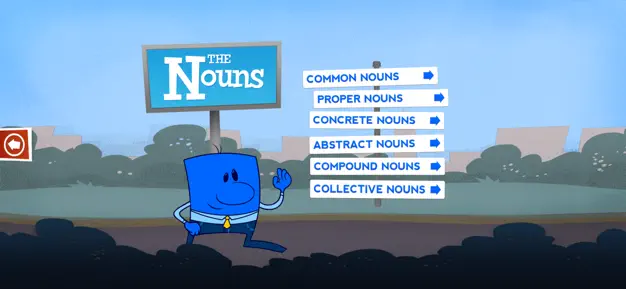
Grammaropolis takes grammar lessons and gives them personality, literally. Each part of speech becomes a colorful character with its own quirks, stories, and catchy songs. It’s an innovative approach for children who find grammar dull or confusing.
The app teaches concepts like nouns, verbs, and conjunctions through animated neighborhoods, music videos, and quizzes. Kids don’t just memorize rules. They meet them. It’s one of the best grammar apps for kids because it transforms abstract ideas into relatable characters.
The tone feels playful but not babyish, making it ideal for ages 7 to 13. Teachers and parents can track progress, while students get visual and auditory learning that sticks.
Grammaropolis succeeds because it makes kids laugh and learn at the same time, and that’s rare in language education.
Key Features
- Character-based learning that turns grammar lessons into a story that kids can follow.
- Interactive songs and videos to reinforce repetition on grammar learning.
- Built-in quizzes after each session for progress tracking and memory retention.
- Users can explore different categories (Verb City or Pronoun Place) to keep learners engaged.
- Offline access is available. Lessons and videos are usable without Wi-Fi.
- Dashboards for teachers and parents to view scores, completion, and user progress.
Pricing
The app is free to download, but special features require paid access. In-app purchases range from $1.99 to $9.99 for specific content bundles, including songs, quizzes, and videos.
2. Smashing Grammar
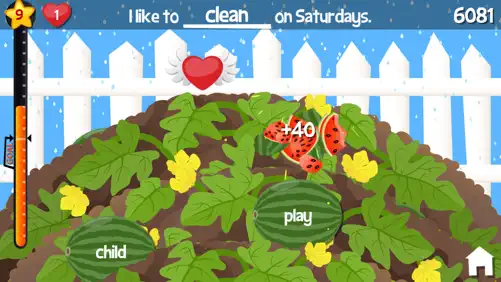
Smashing Grammar makes grammar practice feel like an arcade game. Kids tap, swipe, and “smash” their way through parts of speech, turning dull drills into quick reflex challenges.
It works for early learners through pre-teens and is one of the best grammar apps for kids who prefer action over flashcards.
The app covers nouns, verbs, adjectives, and more while reinforcing vocabulary and spelling. Each mini-game blends motion and language to help children remember grammar through repetition and fun.
The British-style narration adds charm, while the Montessori-inspired grammar symbols give visual cues for each word type.
Key Features
- It teaches all significant parts of speech, including nouns, verbs, adjectives, pronouns, and conjunctions.
- Builds vocabulary and sentence structure by encouraging active word recognition.
- Uses Montessori-inspired grammar symbols for visual learners who benefit from shape and color cues.
- It features creative levels, such as the Verb Garden and Spelling Slumber Party, that make repetition engaging.
- Self-paced learning, allowing kids to replay levels until mastery.
- It includes audio instructions that support early readers and ESL learners.
- Supports Family Sharing for up to six family members.
- It maintains a kid-safe, ad-free environment for focused study.
- It works offline, so kids can keep learning anywhere.
Pricing
Smashing Grammar is available on iOS through the App Store. It’s a paid app with a one-time purchase that typically ranges from $3.99 to $5.99, depending on regional pricing and promotions.
There are no ads or in-app purchases, so once you purchase it, all features are unlocked.
For families who use multiple Fairlady Media titles, the collection is part of a program that sometimes offers bundled discounts. Apple’s Family Sharing lets up to 6 users share a single purchase, making it cost-effective for households with more than one learner.
3. English Tenses & Verbs Smash
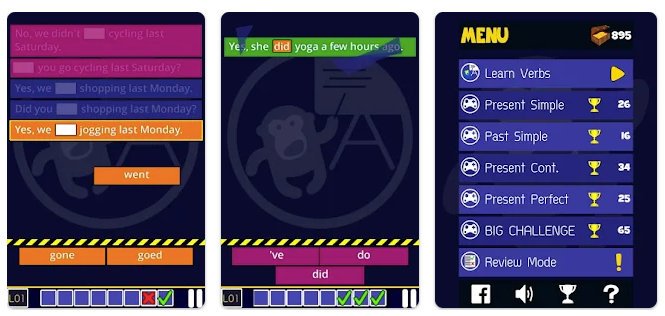
You learn verbs and tenses by literally smashing the right answers before the sentences hit the ground. It’s fast, visual, and oddly satisfying. Designed for ESL learners but engaging enough for kids, it turns tense drills into reaction challenges that build instinctive recall of grammar.
You’ll practice four main tenses through real sentence patterns. What makes it one of the best grammar apps for kids is its effective use of pressure and repetition.
The game rewards accuracy and speed, which keeps both your focus and your reflexes sharp. It’s the grammar workout that doesn’t feel like homework, and that’s what makes it work.
Key Features
- More than 500,000 sentence combinations that strengthen real contextual grammar understanding.
- Inclusion of 120 of the most common regular and irregular verbs used in daily English.
- Teaches four key tenses that most learners struggle with and provides constant feedback for each.
- It improves reaction time and grammatical instinct through fast-paced gameplay.
- Reinforces auxiliary verbs, negatives, and contractions that are often skipped in textbooks.
- It works well for TOEIC and IELTS preparation by teaching verbs in natural sentence patterns.
- It corrects errors immediately, showing learners the proper form after every mistake.
- Suitable for both kids and adults learning English as a second language.
- It includes both British and American English forms for real-world relevance.
- It feels like a game but teaches like a real grammar coach.
Pricing
English Tenses & Verbs Smash is available for free on Google Play. The base version gives access to the main game and a limited number of lessons.
Optional in-app purchases unlock all verb sets and advanced tenses, usually priced between $1.99 and $6.99, depending on the content pack. There are no recurring subscriptions, which makes it budget-friendly for students and teachers.
4. DoodleEnglish
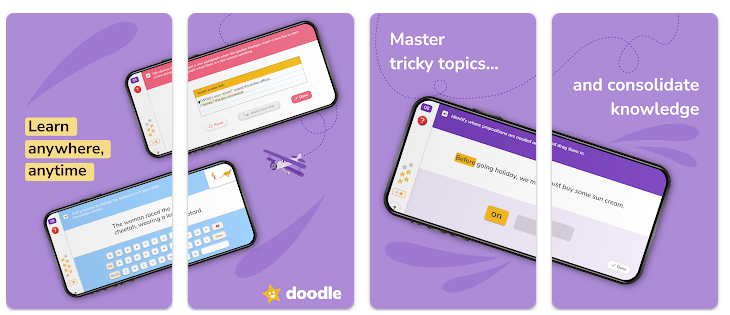
DoodleEnglish is a smart grammar and reading app that actually learns how your child learns. It uses adaptive technology to pinpoint weaknesses and build personalized lessons in grammar, punctuation, and comprehension.
Kids work through short daily exercises that adjust based on their answers, while parents track progress in real time. The result is steady improvement without the boredom of drills or worksheets.
The interface is colorful but not distracting, which helps kids stay focused longer. Teachers use it because it builds consistent habits and reinforces classroom lessons through repetition.
Key Features
- Personalizes every lesson using adaptive technology that identifies each child’s strengths and weaknesses.
- Builds grammar, punctuation, and comprehension skills through consistent, short practice sessions.
- It uses the Proxima™ engine to design lessons that evolve with each correct or incorrect answer.
- Real-time progress tracking through the Parent Dashboard.
- It encourages daily learning with reminders and rewards for consistent practice.
- It helps teachers reinforce grammar and spelling rules through structured exercises.
- Covers core topics like verbs, tenses, adverbs, and sentence building in primary English.
- Designed for children aged 5 to 11, making it ideal for elementary-level learners.
- It works offline once downloaded, allowing study anywhere.
- It comes packaged with DoodleSpell access under the same subscription.
Pricing
DoodleEnglish works on a subscription model. A monthly plan typically costs $9.99 per child, while an annual plan costs $79.99. Family plans and bundles that include DoodleSpell are available for higher rates, often exceeding $200 per year, depending on the number of users.
The app offers a free trial, allowing parents to test the adaptive learning system before paying. Subscriptions renew automatically unless canceled, and prices may vary by region or store platform.
5. Johnny Grammar Word Challenge
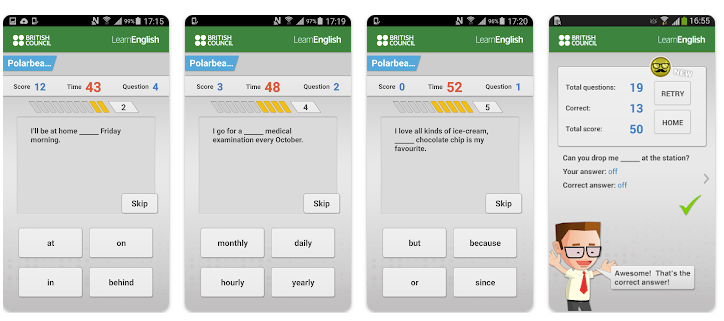
Johnny Grammar’s Word Challenge is like a grammar boot camp with a stopwatch. You get 60 seconds to answer as many questions as possible about spelling, vocabulary, and grammar.
The British Council ensures the content is accurate and educational, not just random trivia. The pace keeps your brain alert, and the timer pushes you to think faster in English.
It’s great for learners who want to improve real-life English fluency under pressure. The app rewards you with badges, levels, and leaderboards, which makes studying feel more like gaming. The feedback after each question helps you fix mistakes instantly, rather than guessing.
Key Features
- It tests grammar, vocabulary, and spelling through 60-second challenges that improve quick recall.
- Includes easy, medium, and challenging levels that suit beginners and advanced learners.
- 10 themed topics like travel, food, and idioms that mirror daily English use.
- It provides instant explanations for incorrect answers, reinforcing understanding.
- Supports global leaderboards for friendly competition and motivation.
- It requires no sign-up to play and starts instantly.
- It is suitable for both self-learners and classroom use as a warm-up activity.
Pricing
Johnny Grammar’s Word Challenge is completely free to download and play. The app contains no subscription fees and keeps all essential features open to every user. There may be occasional ads, but they do not interfere with gameplay or lessons.
6. LingoWar
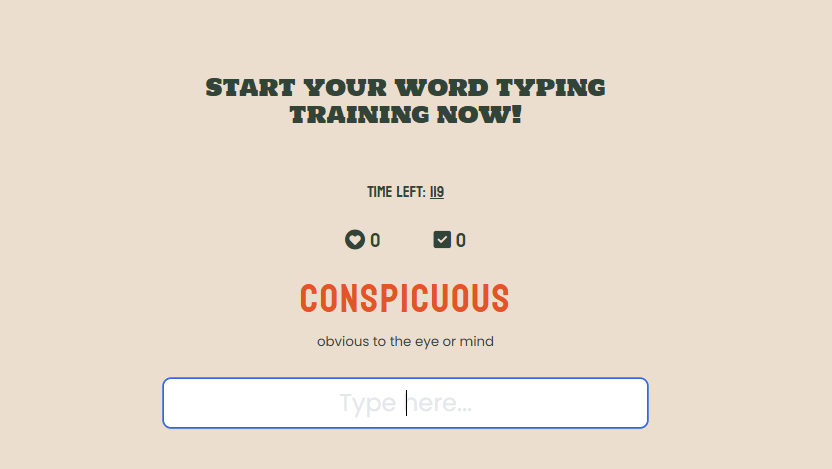
LingoWar makes vocabulary practice feel like a battle of wits instead of a boring memorization session. It’s a browser-based game where you face off against timed challenges that test your word knowledge, grammar sense, and recall speed.
There’s no need to download or register. You can play directly from any browser. It’s fast, simple, and surprisingly addictive. The platform automatically tracks your progress, showing how your word recognition and accuracy improve over time.
Each round pushes you to recall words quickly in context, naturally building fluency.
Key Features
- Fully web-based, allowing instant play without downloads or installation.
- It strengthens grammar and vocabulary recall through fast, timed word challenges.
- Adjusts difficulty as you improve, keeping the experience balanced and rewarding.
- It displays performance stats so you can track accuracy and learning progress.
- Suitable for both kids and adults who want a quick, focused grammar refresh.
- Requires no account, making it ideal for classrooms or quick personal use.
- It offers instant feedback, so you understand every mistake right away.
- It turns daily vocabulary study into a competitive, engaging challenge.
Pricing
LingoWar is entirely free to play. There are no subscriptions, ads, or in-app purchases. You can access it instantly through your web browser and start learning in seconds.
How to Choose the Right Grammar App
Choosing the right grammar app isn’t about picking the flashiest design. It’s about finding what actually matches how and why you learn. Before downloading anything, think about these four key factors.
Age and learning level
A first grader and a college student don’t need the same app. Younger learners benefit from visual, game-like platforms that use characters, colors, and rewards.
Older students or professionals need structured lessons, grammar explanations, and detailed error feedback. Always check the recommended age or proficiency level before starting.
Desired outcome (writing, speaking, school, or professional use)
If your goal is better essays or reports, look for apps that teach sentence structure, punctuation, and formal grammar. If you want to improve your conversation skills, choose tools that include listening, quick recall, or dialogue-based exercises.
Some apps train exam-style accuracy, while others improve spontaneous fluency. The key is knowing which skill matters most to you.
Price and offline access
Many grammar apps start free but lock key lessons behind paywalls. Compare what’s available without a subscription and what requires payment. Also, if you travel or have limited internet, offline access really matters.
Apps like LingoWar and Grammaropolis offer strong features without mandatory subscriptions, making them ideal for consistent, affordable use.
Engagement style (games vs. correction)
Some learners thrive on points and badges, while others prefer quiet correction and analysis.
Game-based apps keep kids motivated, while feedback-driven ones suit adults who want precision. The best approach is balance. Find an app that challenges you to play, but also explains why an answer is right or wrong.
Wrapping Up
These apps will not fix grammar on their own. What they can do is turn repetitive practice into short, focused bursts of attention that feel more like play than punishment. When you choose solid tools, set simple routines, and stay involved, grammar apps become one more support for reading, writing, and speaking well.
Ultimately, grammar is about expressing ideas clearly. If an app makes you write, speak, and think in better English. Choose your tool, practice daily, and let results speak for themselves.
![15 Daily Vocabulary Habits to Improve Your English Skills [Tips]](https://lingowar.com/blog/wp-content/uploads/2025/07/2.jpg)